
The visual designer for the metadata of an Adyton terminal: screens, tickets, device protocols, the app manifest, transformation rules and messaging flows. It opens the very JSON files the terminal loads and rewrites them touching only what you changed. And it does not imitate the terminal: it runs it — the linter, the print engine and the protocol engine are the Lua files from your own checkout, running unmodified.
It does not imitate the terminal: it runs it
a fake printer and serial port that record
A JavaScript copy of the logic goes stale the day the engine changes. Here the verdict, the paper and the frame are the engine's own: the Studio merely puts in front of it a printer and a serial port that write down what the engine does. Without a checkout you can still edit, and the Studio says it cannot validate instead of making up a result.
Three editors, because they are three different things
Screens
Node tree · schematic · inspector. Node types and on_click verbs come from the terminal's linter. The typical case: a button with no id — the terminal drops it silently; here it is an error that clicks through to the node.
Tickets
Blocks · paper strip · inspector. The strip is printed by print_engine.lua with your data; clicking a line selects its block.
Protocols
Command builder: the frame assembled by protocol_engine.lua, with a byte ruler and a hex dump; the device's reply interpreted by the real parser. Sequences as terminal · device · host lanes.
From the file to the Studio — the same thing, seen two ways
{
  "type": "button",
  "id": "btn_back",
  "text": "✕",
  "on_click": "load_manifest:home.json",
  "tint": "#0D1117",
  "text_color": "#8B949E"
}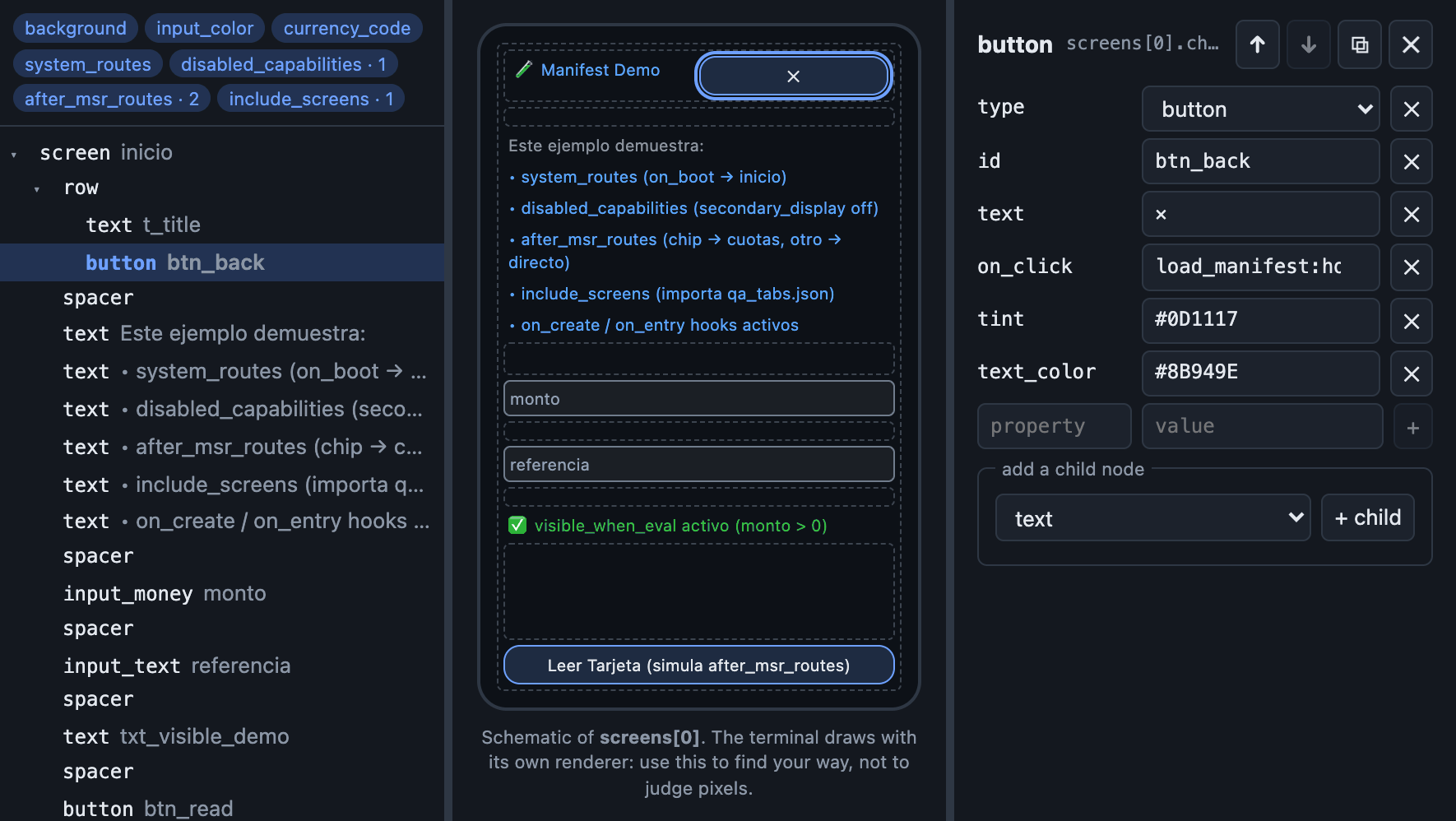
A screen node: the JSON object is the node highlighted in the tree and in the schematic; its keys are the inspector's rows.
"blocks": [
  { "type": "text", "style": "marca",
    "text": "{{header.business_name}}" },
  { "type": "separator" },
  { "type": "row", "left": "Ticket {{ticket_number}}",
    "right": "{{time}}" },
  { "type": "items", "array_path": "items",
    "item_template":
      "{{item.qty}} x {{item.description}}|{{money:item.total}}" },
  { "type": "row", "style": "total",
    "left": "TOTAL", "right": "{{money:total}}" },
  { "type": "qr", "data": "{{qr}}", "size": 6 }
]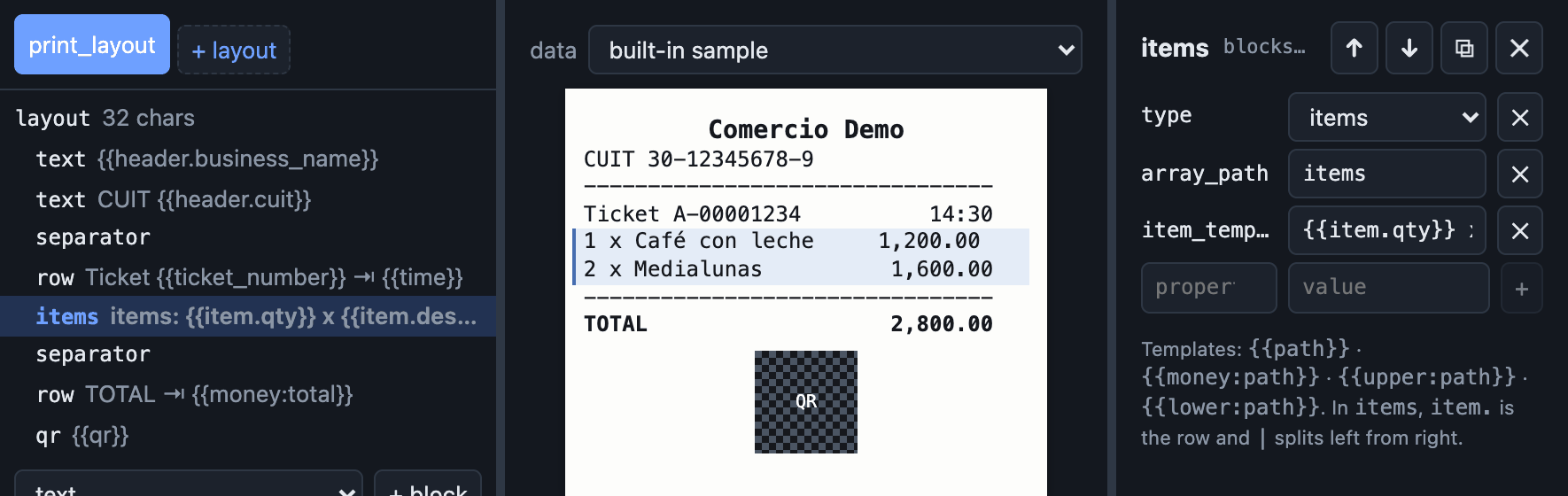
A ticket: every block of the print_layout is a row; on the right, what the real engine prints with sample data.
"INIT_TRANSACTION": {
  "cid": "CC1",
  "payload_template": true,
  "payload_hex": "{{cid}}{{timeout_padded}}{{date_yymmdd}}
     {{time_hhmmss}}{{trx_type_code}}{{amount_fixed}}…",
  "transform_vars": [
    { "source": "timeout", "target": "timeout_padded",
      "transform": "pad_left",
      "params": { "length": 3, "char": "0" } },
    { "source": "amount", "target": "amount_fixed",
      "transform": "float_to_fixed",
      "params": { "total_length": 12, "decimals": 2 } }
  ]
}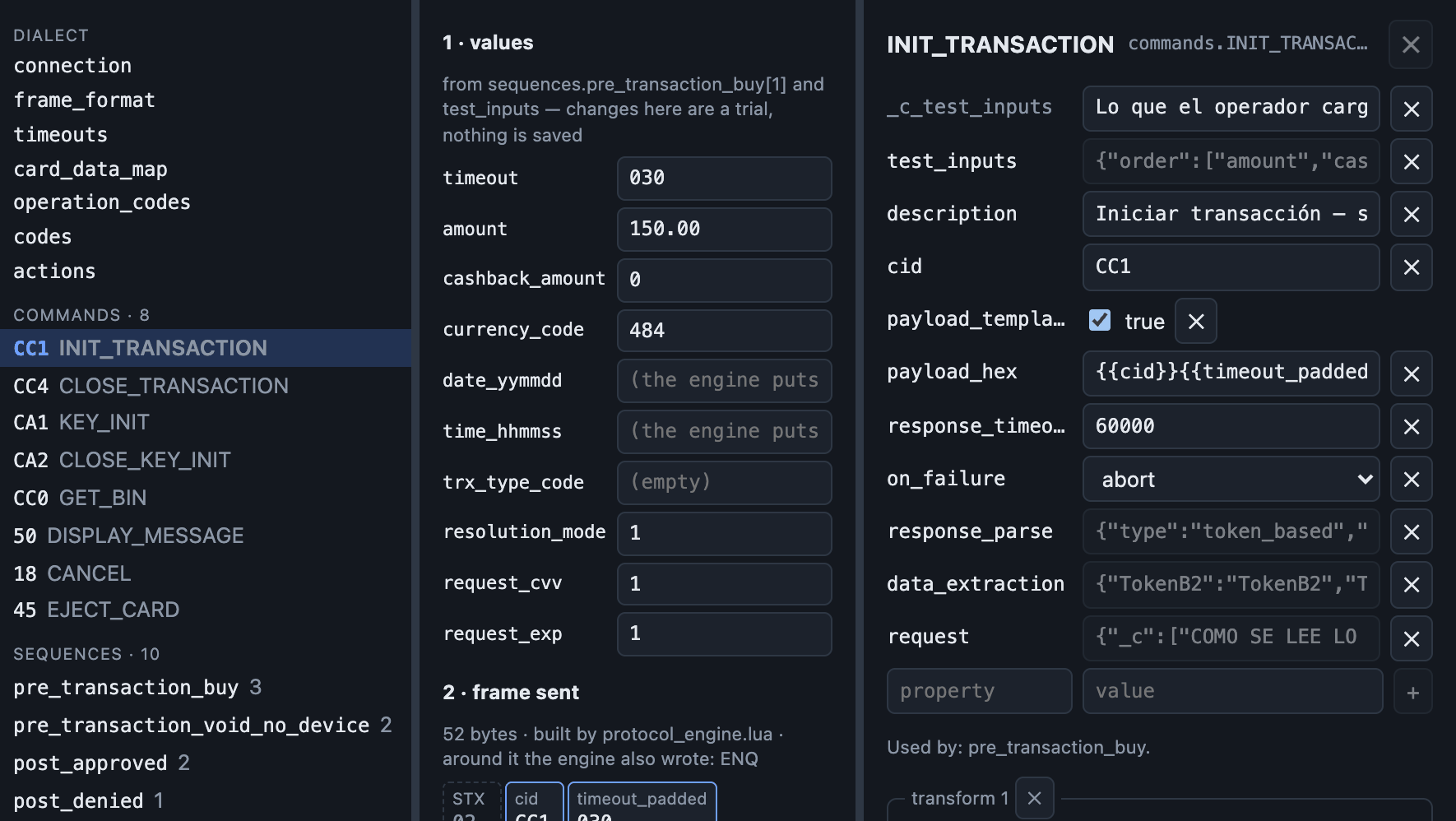
A protocol command: the template and its transforms, turned into the frame the engine builds, byte by byte — with the field left empty marked in red.
What it tells you and the terminal does not
A ticket that does not print its body
The “style” model (size · columns · totals) is not read by any code in the runtime. The Studio explains it and offers to add the equivalent print_layout, without touching the rest of the file.
A command that goes out with no fields
payload_format is not read by the engine: the frame is the CID alone. And {{cid}} without payload_template goes out with the braces as literals.
An empty field in a fixed-width frame
The Studio runs the command with everything the file declares and marks in red whatever comes out empty: a separator declared one step too late misaligns everything after it.
A column shifted by an accent
Older engines justify by counting bytes: “Café” weighs five. The Studio measures the way your checkout's print_engine.lua does — characters when it justifies with utf8_len (v2.1), bytes before — so the warning disappears once the engine is fixed.
Every warning from the Studio is a statement about what the engine does with the file, not a style opinion. All of them came from opening Adyton's real examples.
What the terminal measured, and the rest of the metadata
analytics_agent report or JSONL snapshotmanifest_sha256matches this exact file text
Patterns, not diagnosis
Explicit rules over the numbers, no model: ≥ 30 % of visits go back, errors in ≥ 20 % of visits, long stay without inputs, transit screen. Each needs at least 10 visits and says which numbers triggered it and which node to look at.
App manifest (0.9.0)
app_manifest.json — codecs, network, features, the bus block — gets its own group and editor: tree plus inspector, minimal-diff saves.
Rules validated by the terminal's SDK
transforms/ is checked by vendor/netalchemy/transformation-sdk/rule_validator.lua from the opened checkout, under Lua 5.4 / WebAssembly — no second implementation of the rules. flows/ (messaging) has its own group too.
No empty pane
Any other JSON opens as a tree with the property grid. Build outputs (build/, out/, target/, __pycache__/, virtual environments) are no longer listed.
The numbers apply only to the version the terminal actually ran: edit and save, and the terminal must load the new text before its measurements count again.
Saving never costs a comment
"_c" keys, your indentationevery change is a splice
Indentation of 1, 2 or 4 spaces, one-line objects, "_c" keys: everything survives. Moving a node moves its text as is. A protocol's control characters are shown and typed as <FS> and stay in the file as JSON escapes.
One interface, three ways to run it
--repo for the team, with Pull and PublishmacOS, Linux and Windows on arm64 and amd64, built from a single machine. It does not need the NetAlchemy SDKs. Versions with a baseline, hash-chained audit and roles in local SQLite; light / dark mode that remembers your choice.
One core, two applications
What is shared
Host, confined folder, git, versions, audit, roles, panels, desktop shells: the same chassis as Alchemy Studio (NetAlchemy rules and flows).
What is its own
The editing surfaces have nothing in common — a screen is not a rule, a ticket is not a flow — and that is why they are two tools, not one with tabs.
What comes next
Faithful preview by pushing the manifest to an emulator over the bus; publishing to Adyton's targets (APK assets, TMS) — today publishing is commit + push.
Coming soon
Common security and audit (Studio Kit)
The common layer of every Studio, built once in NetAlchemy: a session that expires when idle, a usage audit with retention, latency metrics, languages, theme and preferences. Orq Studio, the agents' bus panel, uses it first; Adyton Studio adopts it next.