
What Spoon is to Pentaho, for the NetAlchemy metalanguage. It opens the very files the runtime loads, edits them and writes them back. Metadata, never code — and no format of its own: close the IDE and your rules are still readable YAML, comments included.
Metadata, not code — the IDE does not own your rules
flows/*.flow.yamlyour files
Editing one field yields a one-line diff: comments, indentation, quoting and alignment survive. Verified byte for byte by opening and saving hundreds of real rules, whole 5G/6G migrations included.
The screen
Rules as an ordered grid of mappings (Target ← Source · Value · Apply + When); flows as a diagram with a per-step inspector (to · do_rule · do · parallel). Order is the program: rows move, they never sort themselves. Every panel resizes.
From the file to the Studio — the same thing, seen two ways
ClientToTarget:
  - Target: '%Temp.In.amount'
    Source: '%Registry.Order.amount'
  - Target: '%Target.score'
    Apply:
      - "@Sum(%Temp.In.amount,0)"
  - Target: '%Target.decision'
    Value: 'auto'
  - Target: '%Target.decision'
    Value: 'review'
    When: '%Temp.In.amount > 1000'
  - Delete: '%Temp.In'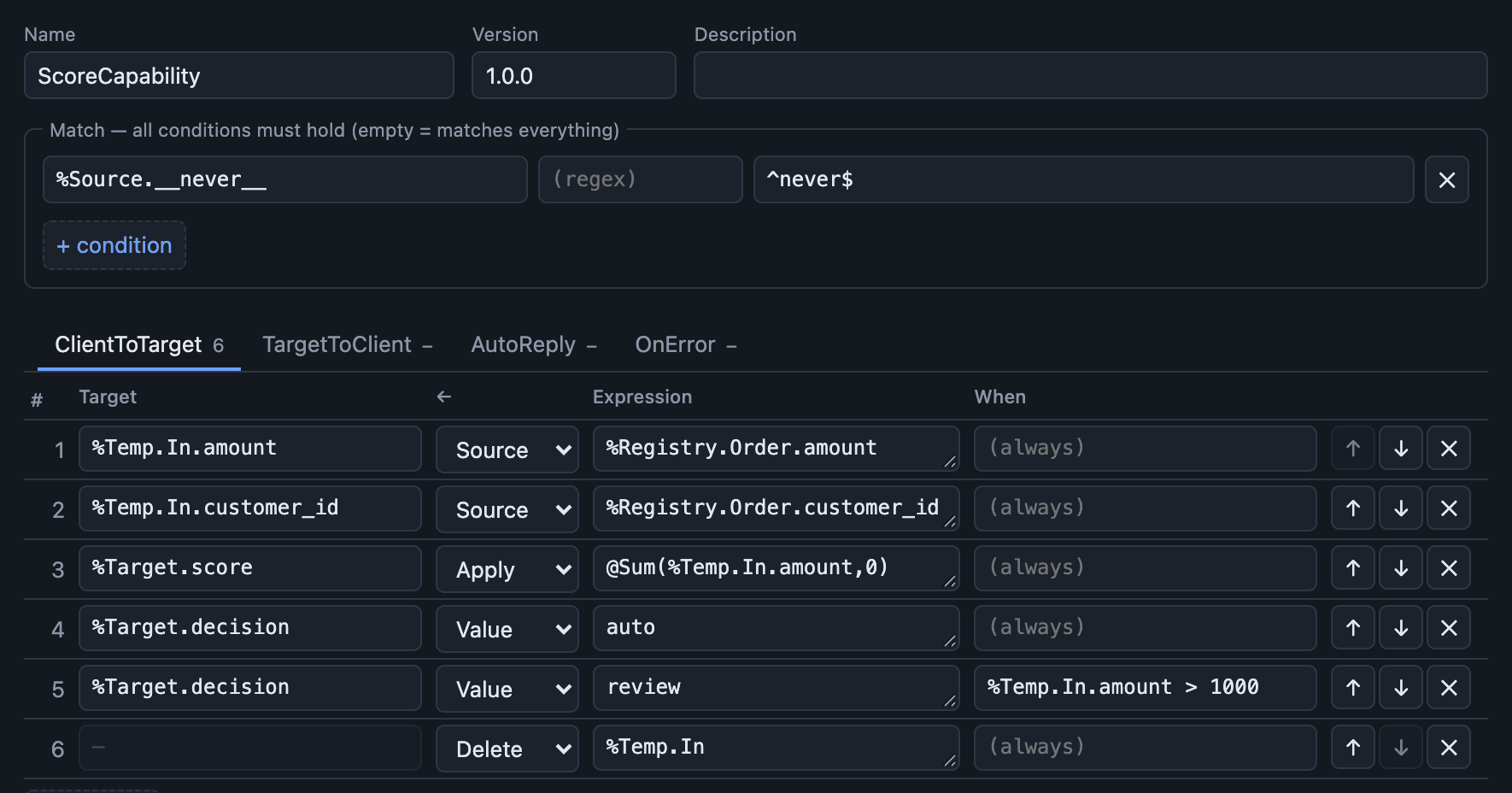
A rule: every mapping in the YAML is a row of the grid, in the same order. The When condition has a column of its own.
  - to: h_op
    retry: 2
    headers:
      authorization: "@Concat('Bearer ',%F.token)"
    request:
      amount: "@FixedToFloat(%S.Amount,2)"
      reference: "%S.Reference"
    response:
      authId: "%P.data.id"
      code: "%P.data.code"
    on_error:
      then: compensate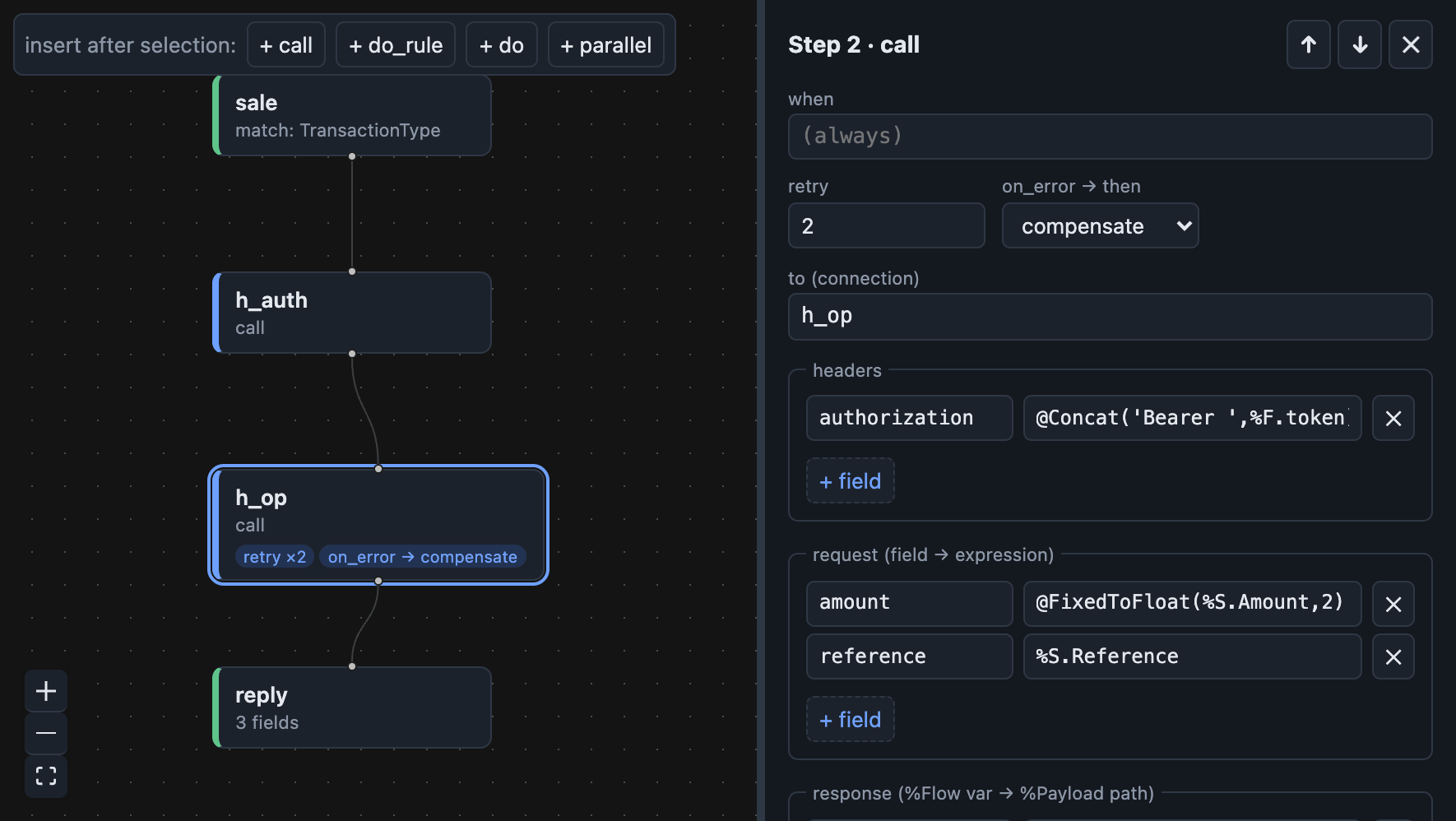
One step of a flow: the to: h_op block is the selected node; retry and on_error show on the diagram and are edited in the inspector.
The decisions that hold it together
The contract is generated
The palette comes from running the function-sdk vocabulary, from the bridge's register_* calls and from CLEAR_PREFIXES. Add a function to the SDK and it shows up in the IDE.
Validation is the runtime's
There is no JavaScript copy: the IDE loads the SDK's rule_validator.lua and rule_loader.lua and runs them — on lua-runtime or on Lua 5.4 / WebAssembly. Same file, same verdict.
Saving never costs a comment
Edits mutate the YAML document in place; writing respects each file's own layout, with a safety net: if the text does not parse back to the same data, it is discarded.
Problems says who is talking
SDK validator = the engine's verdict. Designer lint = what the engine does not check on load: an unknown to, a misspelt function.
One interface, three ways to run it
Lua 5.4 / WebAssembly
production engine
alchemy-studio --repoPull · Publish = commit + push
Desktop and served are the same Go binary (alchemy-studio, ~12 MB with the UI inside): what you try on your machine is what runs on the server. Saving only touches the clone; publishing is an explicit act; on a conflict the IDE rolls back and tells you — it does not merge business rules.
Governance — local too, SQLite by default
Versions with a baseline
Every save is a version. The first time a file is touched, how it was before is kept as well: you can always go back.
Hash-chained audit
Open, save, conflicts, pull, publish, denied access. No content: paths and hashes. Each entry includes the previous one's hash — altering a row breaks the ones after it.
Roles
viewer < editor < publisher < admin. Many prepare, few release. A personal install never locks out its only user.
Safe even on your own machine
Only .yaml inside the opened folder; conditional, atomic writes; refuses requests from other web pages (CSRF / DNS rebinding); the webview gets no IPC permission.
The store uses go-core/db-bridge: pure-Go SQLite by default, with Postgres, MySQL, SQL Server, Oracle and document engines already supported by the same layer.
Six platforms, three flavours, a single machine to build them all
All three open the same interface on the same host, for macOS, Linux and Windows on arm64 and amd64. The host is pure Go and cross-compiles everywhere; the shells are built from a Mac with Docker: Linux in a container, Windows x64 with MinGW-w64 and native Windows ARM64 with llvm-mingw — no MSVC, no licences. If the shell dies, the host shuts itself down. Verified on all three operating systems. Light / dark mode that remembers your choice.
Where it is going
Extensible by rules
Policy, lint, save/publish hooks and the audit sink as rules and flows run by an embedded bridge — editable with the IDE itself.
Rich, multilingual sheets
Parameters with type, default and examples; text per language. Capability rules documented like library functions.
NAP with and without docs
The same package in two variants: development (with sheets) and deployment (without).
Preview and more perspectives
Run a rule against a message with a step-by-step trace; a config.yaml editor. Adyton metadata already has its own application on this core: Adyton Studio, which since 0.9.0 also validates the terminal's transformation rules with this same SDK rule_validator.lua.
Coming soon
Common security and audit (Studio Kit)
The common layer of every Studio, built once in NetAlchemy: a session that expires when idle, a usage audit with retention, latency metrics, languages, theme and preferences. Orq Studio, the agents' bus panel, uses it first; Alchemy Studio adopts it next.