Adyton
The application is metadata.
Changed live, across the whole fleet.
The terminal runtime of the NetAlchemy ecosystem: screens, flows, protocols, receipts and devices are declared — and hot-swapped across the whole fleet, without recompiling or re-certifying the binary.
Today every application is a binary. And every binary, a project.
Manufacturers maintain one app per customer and per model; whoever operates a fleet —acquirer, bank, aggregator, gateway, large merchant— maintains one app per terminal brand. Every business change —a promotion, a receipt, a new host field— goes back through development, QA, certification and rollout.
For terminal manufacturers
- Every customer asks for their application, with their protocol and their receipt: N developments on the same hardware.
- A new model means porting N applications, not one.
- The competitive edge stops at the hardware; someone else writes the software.
For fleet operators
- A mixed fleet —several brands, several models, pinpads, registers and mobile devices— means several codebases for the same operation.
- Changing a flow or a message field is a release: weeks, windows, risk.
- The TMS deploys binaries and parameters; it does not deploy the application.
One signed binary.
Every application, in metadata.
Adyton separates what depends on the hardware —reader, printer, cryptography, pinpad— from what is business. The former lives in the engine's brand layer: the drivers for every brand travel inside the same binary and the device is recognised at start-up — which vendor SDK ships inside is a packaging decision, not an application one. The latter is a declarative manifest that travels, gets validated, is applied hot and keeps its provenance on record.
No native code
Screens, navigation, validations, sale flow, receipts, devices and capability rules are declared in a JSON manifest. The metadata carries no code: declarative rules and expressions; if a script is needed, it is baked into a form or a print template.
Talks to whatever host you have
Codec × transport × dialect in layers that compose. JSON, XML, MessagePack, ISO 8583, BER-TLV; HTTP, TCP with framing, mTLS; pinpad dialects as data; ECR over serial, USB, TCP and WebSocket.
Register, pinpad, desktop or mobile
The same runtime is the register that drives a pinpad, the pinpad that serves a register, the desktop app that charges through a terminal over the bus or the Android phone with an mPOS over BLE. The manifest changes, not the binary.

Metadata is designed. Not typed.
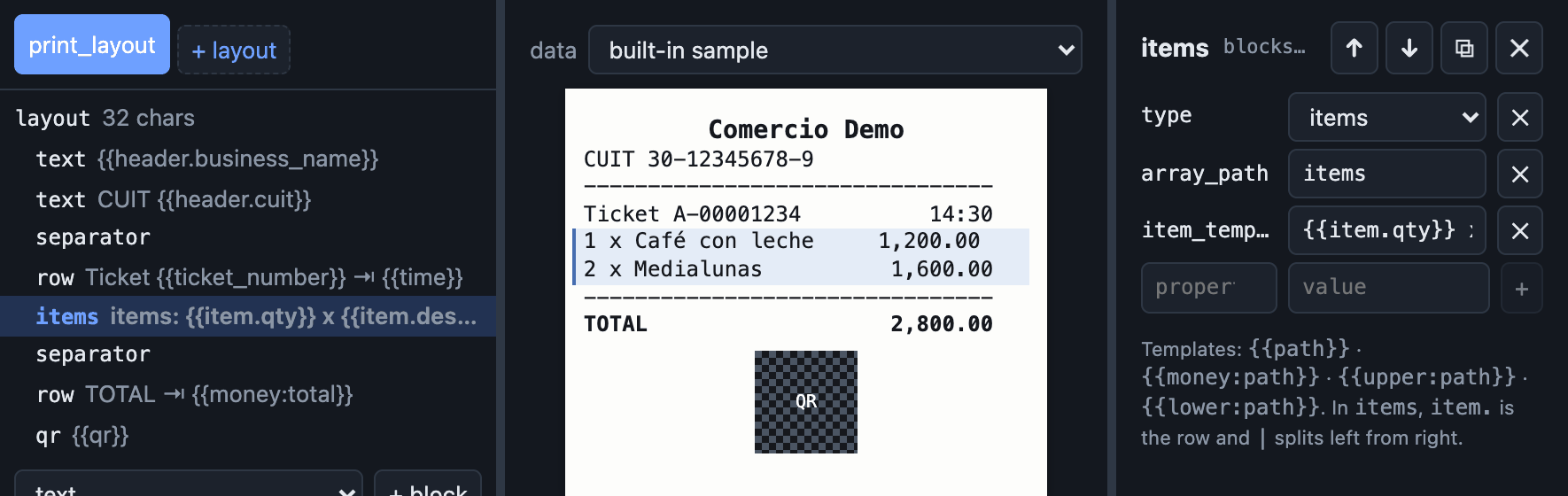
If the application is metadata, the next question is who writes it and how you know it is right. Adyton Studio is the answer: a visual designer that does not imitate the terminal — it runs the terminal's own engines.
The error shows up before the device
The terminal's own validator runs while you edit. A button the device would silently drop is an error with a name and a location.
The paper, before printing
The strip is printed by the real engine with sample data. You see which line does not fit 58 mm without spending a roll.
The frame, byte by byte
Every pinpad command is built by the real engine: offset and length of each field, and in red the one that would go out empty.
The same binary that takes payments governs the network
Terminal, control panel and customers panel run on the same engine: the manifest changes, not the code, and each network builds its APKs with its own name and brand. It is not a separate product or a licensed module — it is the same runtime declaring other channels.
Takes payments. It boots unassigned and the panel gives it its application.
Governs terminals: application, brand, amount, printing, volume. One command reaches one device, one model, a whole brand or the entire fleet.
Governs panels. For whoever sells the terminal service: each customer sees its own panel, and what is not declared for it simply is not there.
That is the business that was not there before: a bank, a retail chain or anyone with a network of devices governs its own —and whoever provides the service governs them all—, on the same piece of software it already bought.
And the terminal does not depend on it to operate. If the management system is down, it keeps taking payments with what it has loaded and boots with the last thing it was assigned. (Independence from the management system, not from the network: without an acquiring host there is no online authorization, and no runtime solves that.)
One payments platform, two customers, six terminals — all in metadata
ACME Pay is the demo's payments platform, with two customers: Coyote Corp and Transportes Correcaminos. Each one governs its terminals from its own control panel; ACME Pay governs both from the customers panel. Sales are authorized against the payments platform (Host-Simulator, ACME Payments API v5.8.2), local or remote — and the engine was not touched.
Six terminals, one application
Landscape, portrait, compact and square: the same definition adapts to each format and each brand.
Each with its own panel
Coyote Corp and Transportes Correcaminos see and govern only their own terminals. What is not declared for a customer is not there.
In containers, no rebuild
Apple Container or Docker with the same commands. The same field-device APK works against the VPS or against the local lab.
Measured on 2026-09-25 on the P70 (emulator): point of sale → terminal → platform, approved with authorization 459326 and 492838; with the bus on the VPS, 485779.
Several networks, the same servers, the same device
A network is whoever provides the payment service, with its merchants and its terminals. Several networks share the bus broker and the payments platform, and their applications live side by side on the same device. Each application shows its network's name and logo: the device screen never says "Adyton".
| Example network | Merchants | Currency |
|---|---|---|
| ACME Pay | two merchants | Argentine pesos |
| A bank processor | two banks | Mexican pesos |
| A retail network | four chains in three countries | each chain's own: Mexican, Argentine or Chilean pesos (no cents) |
Each network, its own link and package
<network>-terminal://payment and com.asaptech.pos.<network>.<flavor>: two networks installed on one device do not collide.
Each panel commands only its own network
A panel's commands reach only the devices of its network. One network's customers panel neither sees nor assigns another network's terminals.
The currency belongs to the merchant
Each merchant charges in its own currency, and the currency travels with the sale all the way to the payments platform. A currency without cents is shown and charged without them.
Measured on 2026-09-25 and 26: the three networks against the same broker, each panel seeing only its own; two networks installed at once on a P70 and on a V660p.
Your register takes payments with the terminal without integrating an SDK: one intent
The register or point of sale asks the terminal for the sale through an Android intent and gets the result back. It never touches cards or talks to the processor.
// what ACME Pay's register sends (amount in cents)
acme-terminal://payment?amount=1970000&operation=SALE

// what comes back
{ "approved": true, "code": "00", "message": "",
  "auth_code": "459326", "reference": "REF-…",
  "amount": "1970000" }
Any brand, its network's link
acme-terminal://payment is handled by whichever ACME Pay terminal is installed, regardless of the manufacturer. Each network has its own —<network>-terminal://payment—: with two networks on the same device, Android does not ask which one to open.
The register can be Adyton too
The demo point of sale is metadata only: catalog, cart, "Pay with the terminal", receipt with the authorization and daily summary.
Each merchant decides from its panel, no reinstall
Register amount · Fixed / Editable, terminal by terminal. Factory default Fixed: the terminal shows the amount set by the register, with no keypad. The central side only changes what the manifest allows.
Measured on 2026-09-25: fixed amount with no keypad, authorization 455341; switched to Editable from the panel, the next sale shows the keypad, authorization 525664.
Every network brings its integrated register, and the register is never left waiting
All networks are built from the same pieces: payment terminals, one control panel per merchant, a customers panel for the platform, and a point of sale that takes payments with the terminal through an Android intent.
Newland P70, N950 and S30 · NewPOS NEW9830 · Verifone V660p and VN110
Two, one per merchant: each governs only its own terminals
The platform governs its merchants' panels, on a Newland X70 or a Chromebook
Integrated with the terminal through an Android intent, built with metadata only
| On the terminal | What the register receives |
|---|---|
| Sale approved | approved: true · code: 00 and the authorization |
| Sale declined | approved: false · code: 05 and the reason |
| The cashier taps Cancel | approved: false · code: 17 · "Cancelada por el cajero" (cancelled by the cashier) |
Cancel is an answer too
If the cashier cancels on the terminal, the register receives an error with code 17 and moves on to the next sale: it is not left waiting for an answer that will never come. The answer goes back through the same channel the request came in on.
Measured: sale requested from the point of sale, Cancel on the terminal → the register shows "NO COBRADA · Cancelada por el cajero" (not charged · cancelled by the cashier).
Tested by the people who will use it
Each case is run by the person who uses that application in real life: that also tests that the guide is understood. The model is the same for every network, and each network has its own protocol with a sheet per device model.
| Role | What they test |
|---|---|
| Platform | assigning and releasing terminals, giving each merchant a panel |
| Merchant | governing its terminals from the control panel |
| Cashier | charging on the terminal and from the point of sale |
| Integrator | the intent sale and its contract |
| Technician | installation, connectivity, coexistence and recovery |
Step by step, with the expected result
Each case says what to do and what should be seen. The sheet records device, APK, result and evidence: each phase assumes the previous one passed.
The merchant's PC is one more device, and the register charges over the bus
The bus is the same code on Android and on the desktop. A PC running macOS, Linux or Windows shows up in the fleet, is governed like a terminal and can be the register that asks a real, emulated or desktop terminal for the payment.
Four apps per network
Terminal, point of sale, control panel and customer panel for macOS (Apple Silicon), Linux and Windows (64-bit ARM and Intel/AMD). They coexist on the same machine and bring their own Java.
One command, four systems
Brand, mode of use, settings and customer arrive over the bus just like on a terminal: the selector targets it by brand and model.
Payments between devices
The point of sale sends payment.request to a terminal; the usual integrated sale, and the result goes back to whoever asked. Cancel goes back too (code 17).
Reconnects before stepping down
If the connection drops, it reopens the same path; if it stays silent, it steps down on trial and goes back to the good one only once confirmed. It never goes silent.
Measured on 27 and 28/09: a single command changed the brand of a Linux, a macOS, a Windows and an Android emulator; desktop point of sale → desktop terminal, approved and cancelled; → Android emulator, approved. The desktop terminal does not read cards: that comes with a USB pinpad.
From the counter to the pocket, without cutting the product
The same metadata runs on Android phones and tablets, on iPhone and on iPad, with its own screens for each device class. And it is published in the official stores without taking anything out of the engine.
Each device, its screens
Phone or tablet, portrait or landscape: the manifest declares the screens for each device class. The app asks only for the permissions it uses: camera, location, internet.
Working, bus included
The same manifest and the same bus as Android and the desktop. It is being validated on real devices.
One profile per channel
Each build carries its profile baked in —development, terminal, enterprise or store—. Brand, theme, screens and parameters arrive over the messaging channel in every version; in the store version, replacing the whole application requires publishing a new version.
ACME Pay on the phone
A payment app for the merchant: sign-in with optional second factor, QR payment, a shareable receipt and the day's transactions. Metadata only.
Where there is no store with those restrictions —terminals, desktop, managed Android— the full product ships. Base themes and styles ship in the build and the central office changes them only if the original manifest allows it. Push notifications are optional: they wake the app; the data keeps going over the bus.
What your technical and security teams will ask
Compliance as the floor, not as a feature
Current standards and good practice (PCI DSS 4.0) forbid exposing card data — here that is not a differentiator, it is the starting point: the runtime stores neither PAN nor track in the clear, PIN block and KSN are provided by the manufacturer's SDK inside the EMV flow, declarable mTLS with client certificate, and traces masked by default.
Provenance and control
Every applied manifest records origin, SHA-256 hash, timestamp and result; measured precedence: TMS › remote › file › APK. The original manifest defines what can be updated remotely; the rest is never touched. On the bus, each device enrolls with its own key, which rotates and which the central office can revoke. Signature by scope, real TTL and sealing: designed on the same gate (S2–S5).
Certifications and custody
Adyton carries no certification of its own: capture, the EMV L2 kernel and the PIN belong to the PTS hardware and the manufacturer's SDK; certification is done per complete terminal with each acquirer. Keys are held in ArcanumVault, the ecosystem's vault (mTLS + HSM/KMS), and reach the terminal over the same channel as the parameters. Living risk management: a risk report with continuous follow-up, SAST and Sonar built into the development cycle.
It does not come alone
Host-Simulator, PayBench and SignalMirror with code and examples; AlchemySwitch (transaction switch) and ArcanumVault (vault) as pieces of the same ecosystem. BSL 1.1 license: visible code and free internal use; distribution, SaaS or OEM under a commercial license; converts to Apache 2.0 in 2031. OEM / white-label model: the first documented OEM is a global point-of-sale solutions manufacturer.
What each player gains
The terminal manufacturer
- One certifiable runtime per model — and on top of it, any application from any customer without recompiling.
- Your brand in the brand layer — ten manufacturers already use the contract; the rest of the product comes ready-made.
- Sell hardware with software inside — pinpad, SmartPOS or dock: the same binary changes role by metadata.
The acquirer, the processor, the bank
- One application for the whole fleet — different brands and models, registers, pinpads and mobile devices, with the same definition.
- Hot-swapped business changes — promotions, installments, receipts, host fields, with no release and no window.
- Your current application, reproduced in metadata — two real apps have already been reproduced with their identity and their sale from a manifest; migration guide written.
The aggregator, the gateway, the fintech
- Your brand on any terminal — white-label via styles; the same application with the identity of each sub-acquirer or merchant.
- Your API as the host — the terminal speaks JSON/HTTPS with response_mapping; ISO 8583 and proprietary dialects by codec and template.
- Mobile and mPOS from day one — Android phone + reader, or SmartPOS, with the same metadata.
The large merchant, the retailer, the ISV
- The register and the pinpad, from the same engine — the terminal serves your ECR over serial, USB, TCP or WebSocket, or drives the pinpad you already have.
- Your signage on the idle terminal — carousel, video and clock by metadata; the merchant's brand on every counter.
- Adyton inside your app — intent, REST, WebSocket or TCP; the payment is invoked and the response comes back over the same channel.
One terminal model. One application of yours. Hot-swapped in front of you.
We propose a bounded trial on your own fleet and your own host, with success criteria written down before we start.
1 · Brand layer
If the model is new, it is integrated —reader, printer, crypto— against the contract ten brands already use. Emulator first, hardware later.
2 · The application, declared
We take a real flow of yours —sale, void, settlement, your receipt, your protocol— and declare it. Tested against Host-Simulator and against your host.
3 · Hot-swap
Published over your TMS or ours: new brand, installments, receipt, host change, pinpad role. No recompiling. With provenance on record.
Eldo Loguzzo · ASAP Technology · eldo.loguzzo@gmail.com · Adyton product sheet · technical annex · NetAlchemy ecosystem